This page provides the information about the Yoton and Akiyo projectors, which arethe cheapest recommended mini projectors, around $60USD/£60/$70CAD or less, which makes good image sizes for projecting patterns. But image size is smaller than the more expensive Magcubic projector. Other other recommended projectors for sewing, are available here.
The recommended Yoton is the Y3 model, which has HDMI port only, no wifi connection (previous Yoton wifi model is no longer available). A casting device, like a chromecast, roku, firestick, ONN, or Apple TV can be added to HMDI port to add wifi connection feature, more info here. Other more expensive Yoton models the Y5 and Y6 for example are not recommeded because the image sizes they make are smaller.
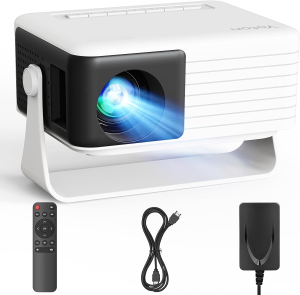
The recommended Akiyo model is the same as the Yoton, except it has wifi capability to connect your device wirelessly, without HDMI cable. (Bluetooth mention in Akiyo pic is not beneficial for projector sewing. Bluetooth on projectors is only for sound.)
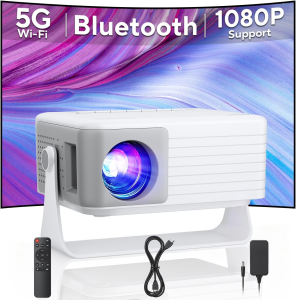
Scroll down for direct links to purchase the Yoton or Akiyo.
Click the + headings below to see details about these models:
These mini projectors are the size of a thick paperback book, and just under 1kg (about 2lbs), so can be easily mounted with a tripod or other non-permanent mount. The reason they can be small and light, yet still affordable, is that the power supply is on the power cord and not inside the projector. The power cord is short, so an extension cord (2 prong) will be needed, and the weight of the power supply will need to be supported where it connects to extension cord, for example with zip ties or tape to tripod, shelf or wall.
These models creates usable image sizes, with size being close to A0 size at 60″ above table. Projector manuals often overstate how large an image will be, but in my tests on multiple devices, this claim of image sizes by the manufacturer seems accurate.
In my tests at 50″ to lens, when connected to computer, image size will be about 42″x24″ (48″ diagonal) . When connected to phone or tablets, image size will be more limited by the shape of the device. In my tests of mobile devices, again at 50″ to lens, image from a phone will be about 42″x19″ (46″ diagonal), and from a tablet, will be about 32″x24″ (39″ diagonal), Larger distances will create larger images, every 3″ higher will increase diagonal image size by about 2″ (which means approximately 1.5″ wider, and 1″ taller for every 3″ of extra distance between surface and lens).
Here is a table with the sizes I am getting when connected to computer, at distances from 50″-64″ / 140cm – 162cm to projector lens (image sizes will be smaller if projecting from phone or tablet):
| Distance from cutting surface to projector lens | Image width | Image depth | Diagonal image size |
| 50 in | 42 in | 24 in | 48 in |
| 55 in | 46 in | 26 in | 52.5 in |
| 60 in | 50 in | 28 in | 57 in |
| 64 in | 53 in | 30 in | 59 in |
| 127 cm | 106 cm | 61 cm | 122 cm |
| 140 cm | 117 cm | 66 cm | 133 cm |
| 152 cm | 127 cm | 71 cm | 145 cm |
| 162 cm | 134 cm | 76 cm | 150 cm |
If you need a larger image size at smaller distances, please see links for Magcubic, or Ultra Short Throw on recommended projectors page.
The image quality is enough for our needs for cutting lines on fabric, and is the minimum recommended 720p native resolution. If your room is sunny, you will find it hard to see projection when sun is bright. Curtains or changing time when cutting to be later in the day will be needed in that case. If curtains are not possible, even some kind of screen in the room to create shadow on the cutting mat will help. Using free Pattern Projector software, image quality can be further improved with the buttons in toolbar to reverse colours, make lines thicker and zoom in on text.
The Akiyo projector linke on this page connects wirelessly (via your local wifi network, internet connection not needed), or HDMI cable. The Yoton model has HDMI port only.
Like any projector, these projectors will connect to any device or computer, steps to connect are here. See note below for Google devices.
The included HDMI cable is very short, so if connecting by cable a much longer cable will be needed. Any basic HDMI cable is fine, no need for expensive one.
Only HDMI cable connection will work with Google devices, because Google products are not compatible with Miracast wireless protocol used on projectors. To create a wireless connection, a Google Chromecast device can be added to projector’s HDMI port, and then that will work with Google phone.
Affordability is different for each person, and varies tremendously across countries, so these projectors is not universally affordable. However, they is on the lowest end of costs of projectors that work for our needs, and that is one reason I am comfortable recommending them. Projector sewing as a social movement must have tools that are reasonably priced, so that it can spread benefits to as many people as possible.
Affiliate links for Akiyo and Yoton models:
Here are affiliate links for the Yoton and Akiyo models I am recommending. The affiliate link funds will be used to maintain and develop this website.
Amazon.com link for Yoton hdmi only model: https://amzn.to/3MphRla
Amazon.com link for Akiyo wifi + hdmi model: https://amzn.to/4r9i9vF
Amazon.co.uk link for Yoton hdmi model: https://amzn.to/4kiBx6F
Akiyo wifi + hdmi model not currently added to UK store
Amazon.ca link for Yoton hdmi model: https://amzn.to/4amXIEy
Amazon.ca link for Akiyo wifi + hdmi model: https://amzn.to/4afCecv
Amazon.fr link for Yoton wifi + hdmi model: https://amzn.to/4ruA27T
Akiyo wifi + hdmi model not currently added to French store
Amazon Australia link for Akiyo wifi + hdmi model: https://amzn.to/3ZpAZU5
Amazon Australia link for Yoton hdmi only model:: https://amzn.to/4961wJ5
Click the .com link and change the “.com” to your country’s Amazon store domain, for example “.se” or “.fr”, etc. leaving the rest of the url the same, then press enter. That trick often works to quickly find the same product on your country’s store. If that doesn’t work and you are searching for the model in your Amazon store, searching for Yoton 720p often brings good results. Check the listing to make sure the resolution is listed as “1280×720”, that is the model that works for us.