Use a Chromecast device added to the projector’s HDMI port
Once you have your projector, before setting it up, connect it to the computer/device you will be projecting from.
“Mirroring screen” is also called “Duplicate”, or screen sharing, and allows projector to show what is displayed on your computer/or device screen. Then you can open patterns on your computer or device and they will also show up in the projected image.
Connecting projector wirelessly to device/computer via Chromecast device
Any projector can be made wireless by adding a Chromecast device (any version, so older/cheaper versions are best) to the projector’s HDMI port. The Chromecast gets power by plugging into the USB port of the projector.
Using a Chromecast works well with Windows and Mac computers, or with Android devices.
With iPads or iPhones, you need a paid app to allow screen mirroring. For these iOS devices, only and Apple TV added to projector can mirror screen wirelessly without a separate paid app. Older, much cheaper, versions of Apple TV will work for our needs, and eBay and other online or local second hand marketplaces are good places to find these older Apple TV devices cheaply.
Steps to Screen Mirror with a Chromecast
- You set up the Chromecast on your home wifi network via Google Home app on a mobile device (can’t be done on a computer).
- Then you screen mirror your computer to the projector, by opening Chrome browser, and using the “Cast” option in the menu. Scroll all the way down to “Save and Share”, click that and you will see “Cast”. Right click on screen is another way to access “Cast” option.
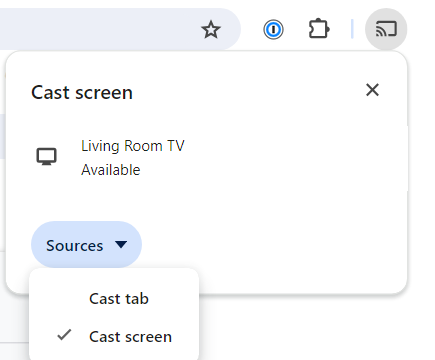
- In the Cast menu, under “Sources” change from Cast Tab to Cast Screen. Then select your Chromecast under Devices. This order is very important. You can’t switch from casting tab to casting desktop while it is casting. You need to activate device after choosing Cast Screen.
- When “Casting Screen”, you have to accept the confirmation message to allow screen mirroring. Occasionally, that popup window is blocked – check near your address bar to allow that popup.